


How to Share Music with Family for Every Generation


Learn how to music across generations with Apple Music Family Sharing, smart headphones, and simple tips for seamless listening together.
Sharing a song has a special magic. Whether you’re introducing classic rock music you listened to as a child to your kids or enjoying high-quality music with your partner late at night, music is a bond that holds family time together.
In this guide, we’ll walk you through the perfect harmony of software and hardware, showing you how the latest audio technology is to create a shared family soundtrack.
Phase 1: Setting the Digital Foundation (Apple Music)
The first step to a musical household is the Apple Music Family Plan.
1. The Setup
First, an adult (the “family organizer”) needs to enable the “Family Sharing” feature in their device’s settings. After inviting up to five other members, each member will have their own media library, personal playlists, and most importantly—exclusive “For You” recommendations.
2. The Shared Library Benefit
While everyone has their own space, you can also access each other’s iTunes purchases. If you bought a digital album ten years ago, your kids can download it to their devices today for free through the “Purchased” tab in the App Store or iTunes.
3. Collaborative Playlists: The Digital Mix tape
The best part of modern family sharing is the Collaborative Playlist. You can make a “2026 Road Trip” playlist with your family and let each member add their favourite songs; this democratic process ensures that everyone’s favourite songs are played on long road trips.
Phase 2: Solving the “Shared Silence” (Hardware for Adults)
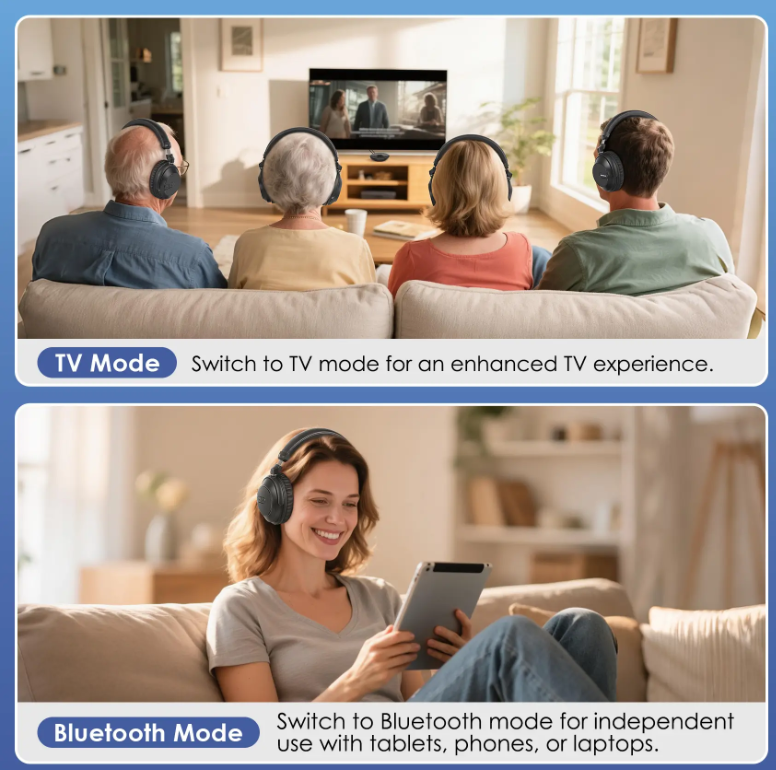
Once your accounts are linked, the next hurdle is physical: how do two people listen to the same thing at once?
This is where group listening headphones for adults come into play.
Professional Solutions for the Living Room
The system is designed specifically for shared domestic bliss. Instead of fighting over the remote or the volume level, this system allows:
● Independent Volume Control: You can have the music loud, while your partner keeps it soft, and both listening to the same source.
● Zero Lip-Sync Delay: Thanks to revolutionary 2.4GHz technology, it completely eliminates the latency of traditional Bluetooth connections.
● Expansion: No longer limited to two users. One transmitter can connect multiple headphones, truly enabling family sharing.
Phase 3: Safely Guiding Children (Sharing Audio with Children)
For parents, the goal is often synchronized peace. You want two kids to watch the same movie or listen to the same audiobook on one iPad during a flight, but you don’t want to deal with tangled “Y-splitter” cables or the risk of high-volume damage.
The Modern Solution: Auracast™ and Wireless Sharing
The latest innovation in Kids Headphones with Audio Sharing is Auracast™ broadcast audio, featured in the series.
● 3-Level Volume Limiter: You can establish a hard limit of 75dB for toddlers, 85dB for kids, or 94dB for flying in an airplane with loud engines.
● Free Movement: Children have the freedom of movement in the back seat of the car or in their living rooms without being tied to their devices or each other.
● Durable Materials Built for Life: Simolio Kidycast headphones have been designed to be durable, they are made from flexible, BPA-free materials so they can survive being jammed into a stuffed backpack or dropped on a concrete driveway.
● One-Button Audio Sync: Kids can now easily join your audio stream without having to worry about issues like tangled wires and complicated settings to establish connectivity with the car. The dedicated broadcast button makes it easy for those children who want to join your audio stream without any stress or hassle.
Phase 4: Pro-Tips For Creating a Happy Family Environment
To maximize your enjoyment of shared music & hardware, keep the following 3 tips in mind:
1. Name Your Devices
In your Bluetooth settings, name each headphones set (e.g., “Dad’s JH-747” or “Leo’s KidyCast”). This significantly simplifies connection management when everyone tries to sync up simultaneously.
2. Use “Screen Time” Limits
If you have Apple Music Family Sharing on your kids’ devices, you can manage their use of explicit content through Screen Time. Also, you can schedule “Downtime” for people listening to music after 9 pm, so they are not right next to you while you are trying to sleep.
3. Create a “Charging Station”
Group listening is only fun if the headphones have power. Set up a central family charging dock. Since the Simolio JH-747D comes with a convenient charging base, it serves as a “home” for the headphones, ensuring they are always ready for the next family movie night.
Conclusion: The Joy of a Shared Soundtrack
Are you ready to sync up? Start by setting up your Family Sharing group with SIMOLIO today, and invest in the hardware that lets you listen, together.